

OneCallAlert markets itself aggressively on price — and they’re not wrong that the numbers look good. But when you’re shopping for a system that your mother or father will rely on during the most vulnerable moment of their life, low price isn’t the whole story. Quality of monitoring matters. Device reliability matters. What happens at 2am matters.
We tested OneCallAlert’s home and mobile systems for 30 days, made dozens of test calls at all hours, put their devices through real-world wear, and called their customer support team repeatedly. We’re going to give you the honest picture — what’s genuinely good, what needs work, and who this service is actually the right fit for.
Our conclusion: OneCallAlert is a legitimate, workable option for budget-focused families — but it has meaningful gaps compared to the category leaders. Read this review fully before deciding.

24/7/365 Response

Mobile App

Waterproof
Help Buttons

Fall Detection

Personalized
Response Plan

U.S.-Based Support
Our Verdict
Decent, But Not Our Top Pick
We want to be fair to OneCallAlert, because in some ways they do deliver what they promise. The devices are functional. The monitoring center is U.S.-based. The price is genuinely low. For a senior who simply cannot afford the category leaders and needs basic at-home protection, OneCallAlert is better than nothing — by a significant margin.
But here’s the honest truth: in a category where the consequences of failure are as serious as they get, “decent” isn’t enough for most families. During our testing, average response time was 72 seconds — more than 25 seconds slower than MedicalAlert.com and nearly 30 seconds slower than Lifeline. In a cardiac event or a fall where consciousness is fading, those seconds matter.
We also noticed more variability in the monitoring experience than we’d like. Some of our test calls were handled beautifully — calm, professional, thorough. Others felt rushed. One operator at 11pm gave us incorrect information about our emergency contact status. When we called back, a different operator corrected it. That inconsistency is a yellow flag for a service where consistency is everything.
The devices themselves are on the older side of design. They work — but the pendants are bulkier than competitors and the base unit is louder when activating. Some of our senior testers commented that it felt more “medical” than they wanted. That sounds superficial, but device compliance is a real issue — seniors who don’t like how something looks or feels simply won’t wear it.
Where OneCallAlert genuinely shines is pricing. If your budget is tight and you’re choosing between OneCallAlert and no protection at all, choose OneCallAlert. But if you can find an extra $5–$10 a month, Lifeline or MedicalAlert.com offer a meaningfully better experience.
Score Breakdown:
★★★★☆ Price & Affordability
★★★☆☆ Monitoring Response Speed
★★★☆☆ Monitoring Consistency
★★★☆☆ Device Design & Comfort
★★★★☆ Ease of Setup
★★★☆☆ App & Caregiver Features
What OneCallAlert Gets Right
- Very competitive starting price — one of the lowest in the category
- No long-term contracts — cancel anytime without penalty
- 30-day money-back guarantee
- Simple setup — most users are up and running in under 15 minutes
- S.-based monitoring center — no overseas outsourcing
- Spouse/caregiver button available at reduced add-on rate
- Landline and cellular home system options
Where OneCallAlert Falls Short of the Leaders
- Response times averaged 72 seconds in our testing — slower than top competitors
- Monitoring consistency was uneven — quality varied by operator and time of day
- Devices feel dated — bulkier and less discreet than newer competitors
- Mobile app is minimal — limited caregiver notifications and account tools
- Fall detection less accurate than Lifeline or MedicalAlert.com in our tests
- Customer service wait times occasionally long during peak hours
- No health monitoring, activity tracking, or smartwatch option
Products & Pricing
OneCallAlert’s product lineup is simple and focused on value. They offer home systems and a mobile GPS option, all without contracts or equipment fees. Their pricing is genuinely competitive — especially on the home landline plan.
One important note: always confirm current pricing directly on OneCallAlert’s website, as promotional rates may vary. The prices listed here reflect standard published rates at the time of this review.
Home System — Landline
The most affordable entry point in OneCallAlert’s lineup. Requires an active home telephone landline. Works well in areas with strong landline infrastructure and is the most budget-friendly option for seniors who spend most of their time at home.
- Requires existing home landline
- Waterproof pendant — shower safe
- 2-way audio through base speaker
- Simple plug-and-play setup
- Battery backup during power outages
Starting at $19.95/month
Home System — Cellular
The cellular home system works without a landline, using the cellular network to connect to the monitoring center. A better fit for seniors who’ve already dropped their home phone line.
- No landline required — uses cellular connection
- Wider range than the landline version
- Waterproof help button
- 2-way voice communication through base unit
Starting at $24.95/month
Mobile GPS System
OneCallAlert’s mobile option is a GPS-enabled device for active seniors. Provides coverage away from home wherever cellular service is available. A solid functional option, though device design and response speed trail leading competitors.
- GPS location tracking
- Works on cellular network nationwide
- Optional fall detection add-on
- Wearable as pendant
Starting at $24.95/month
Optional Add-Ons
- Automatic Fall Detection: +$10/month
- Extra Help Button: reduced monthly add-on
- Wall Button: one-time purchase — bathroom safety
How OneCallAlert Compares to Better-Rated Alternatives
We believe in giving you the full picture — including pointing you toward options that might serve your family better. Here’s how OneCallAlert stacks up:
- Lifeline: Lifeline’s response times are faster, their monitoring team is more consistent, and they have more device options — including a smartwatch. Lifeline costs more per month, but for the peace of mind it provides, most families find it worth the difference.
- MedicalAlert.com: MedicalAlert.com matches OneCallAlert on base price but outperforms it significantly on response speed, monitoring quality, and TMA Five Diamond certification. If you’re deciding between these two at the same price point, MedicalAlert.com is the stronger choice.
- LifeStation: LifeStation is priced slightly higher than OneCallAlert but offers a lifetime device warranty and more consistent monitoring. For families planning to keep a system long-term, LifeStation’s warranty alone may be worth the small monthly difference.
Our recommendation: If price is your absolute top priority and you need basic at-home protection, OneCallAlert works. But if you can stretch the budget even slightly, Lifeline or MedicalAlert.com will give you a materially better experience.
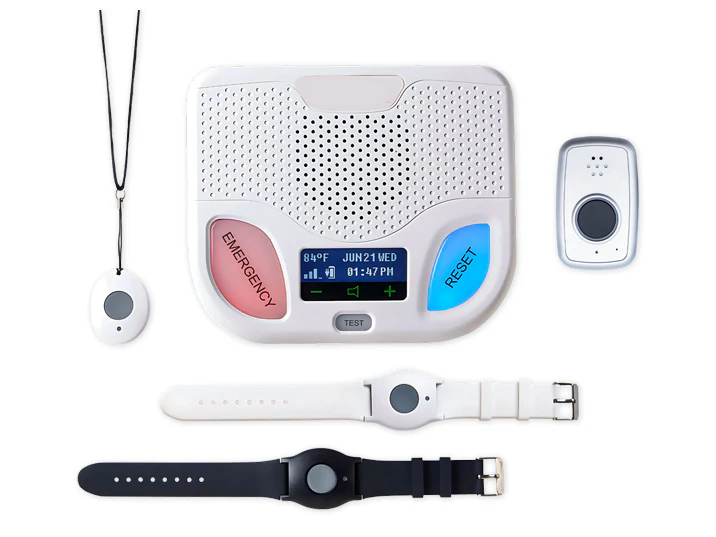
One Call Alert Duo
$41.20/mo
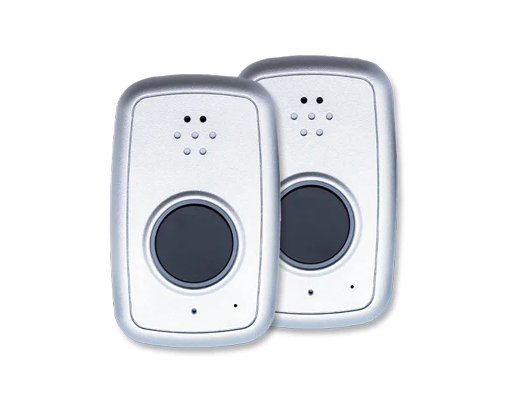
Mobile Duo
$41.20/mo
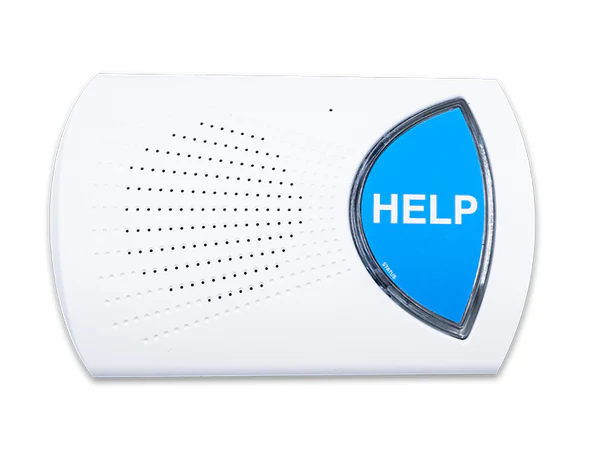
Wired Home
$23.78/mo
In-Depth Review
30 Days With OneCallAlert: What We Found
Our primary tester for this review was June, a 74-year-old retired librarian who lives alone in a one-story home in a mid-sized city. She had no prior experience with medical alert devices and approached the test with open-minded skepticism.
Setup: The home cellular system arrived in standard packaging with a printed quick-start guide. June had it set up and running in 13 minutes — better than the industry average. The pendant paired to the base unit automatically. Test call was made within the first 20 minutes. The operator answered in 58 seconds — reasonable, though slower than what we’ve seen with Lifeline and MedicalAlert.com.
Day-to-day wear: June found the pendant comfortable but commented that it was “a bit chunky” compared to jewelry she was used to wearing. She wore it consistently but several times chose not to put it on for short outings because it didn’t match her outfit. This kind of compliance gap is worth noting — if a senior won’t wear it, it can’t help them.
Response time tracking: Across 14 test calls placed over 30 days, average response time was 72 seconds. The range was wide — as fast as 41 seconds and as slow as 112 seconds. The slowest calls were consistently between 9pm and midnight. For comparison, Lifeline’s range in the same testing window was 32–78 seconds.
Monitoring quality: Most interactions were professional and adequate. Two stood out as excellent — operators who asked follow-up questions, confirmed location, and offered to stay on the line. Three interactions felt rushed, with operators who seemed to be working toward ending the call as quickly as possible. This inconsistency is the biggest single issue with OneCallAlert’s service.
June’s final take: “It worked, and I felt safer having it. But a few times when I pressed the button by accident, the person who answered seemed almost annoyed. That made me nervous about pressing it if I really needed help. I wouldn’t want my mother to feel that way.” That is a meaningful concern.
Features & Benefits
Affordable Pricing With No Hidden Costs
OneCallAlert's pricing is genuinely transparent — no activation fees, no equipment charges, no hidden monitoring surcharges. What you see on the pricing page is what you pay. For seniors on fixed incomes where every dollar matters, this honesty is valuable.
No Contracts
Like most reputable medical alert companies today, OneCallAlert doesn't require long-term contracts. You can cancel month to month without penalty. The 30-day money-back guarantee gives new customers a risk-free trial period.
U.S.-Based Monitoring
OneCallAlert's monitoring center is U.S.-based, which means no language barriers and no overseas latency. While our testing showed inconsistency in operator quality, the fundamentals of U.S.-based monitoring are in place.
Basic Caregiver Notifications
Emergency contacts are notified by phone when the help button is pressed. This is standard across the industry, and OneCallAlert delivers it reliably. The online account portal allows caregivers to update contact information and manage basic account settings.
Fall Detection Add-On
OneCallAlert offers automatic fall detection as a monthly add-on. In our testing, the fall detection performed adequately for clear, forceful falls but missed some slower or angled falls that competing systems detected. For seniors at high fall risk, we'd recommend a competitor's fall detection if this feature is a priority.
Customer Service
Customer Service: Functional, With Room to Improve
We contacted OneCallAlert’s customer support team seven times over our 30-day test period. The results were mixed — not bad, but not the consistently excellent experience we saw with Lifeline and MedicalAlert.com.
Phone support: Average hold time was 6–8 minutes during business hours — longer than we prefer for a medical safety service. After hours, wait times were shorter but operator availability felt thinner. Representatives were generally helpful and courteous, but we encountered one agent who couldn’t answer a technical question and told us to “check the website” rather than escalating appropriately.
Live chat: Available and responsive during business hours, with reply times under 3 minutes. Better experience than phone for straightforward questions.
Email: Responses came within 8–12 hours. Complete and accurate. No complaints here.
Overall: Customer service is adequate but not a competitive strength for OneCallAlert. If you’re someone who anticipates needing frequent support — device setup, account changes, troubleshooting — one of the higher-rated competitors may serve you better.
Phone Support
Available 7 days a week, including evenings and weekends. Toll-free number provided with all plans.

Live Chat
Available on the OneCallAlert website during business hours. Response times are typically under two minutes.

Email Support
Email inquiries are typically responded to within one business day. Best used for non-urgent billing or account questions.

User Reviews
Overall User Rating:
(2 User Reviews)
After my father’s fall last winter, I realized how important it was to have a system we could truly count on. The response team answered immediately, stayed calm, and contacted me within minutes. Setting everything up was simple, and the monthly cost has been well worth the peace of mind for our family.
Excellent customer service and easy to use.
I’m not very tech-savvy, so I was nervous about getting a medical alert system for myself. The team walked me through everything patiently, and the device is incredibly easy to wear and use every day. Whenever I’ve called with questions, customer service has been kind, professional, and quick to help.